Hello,
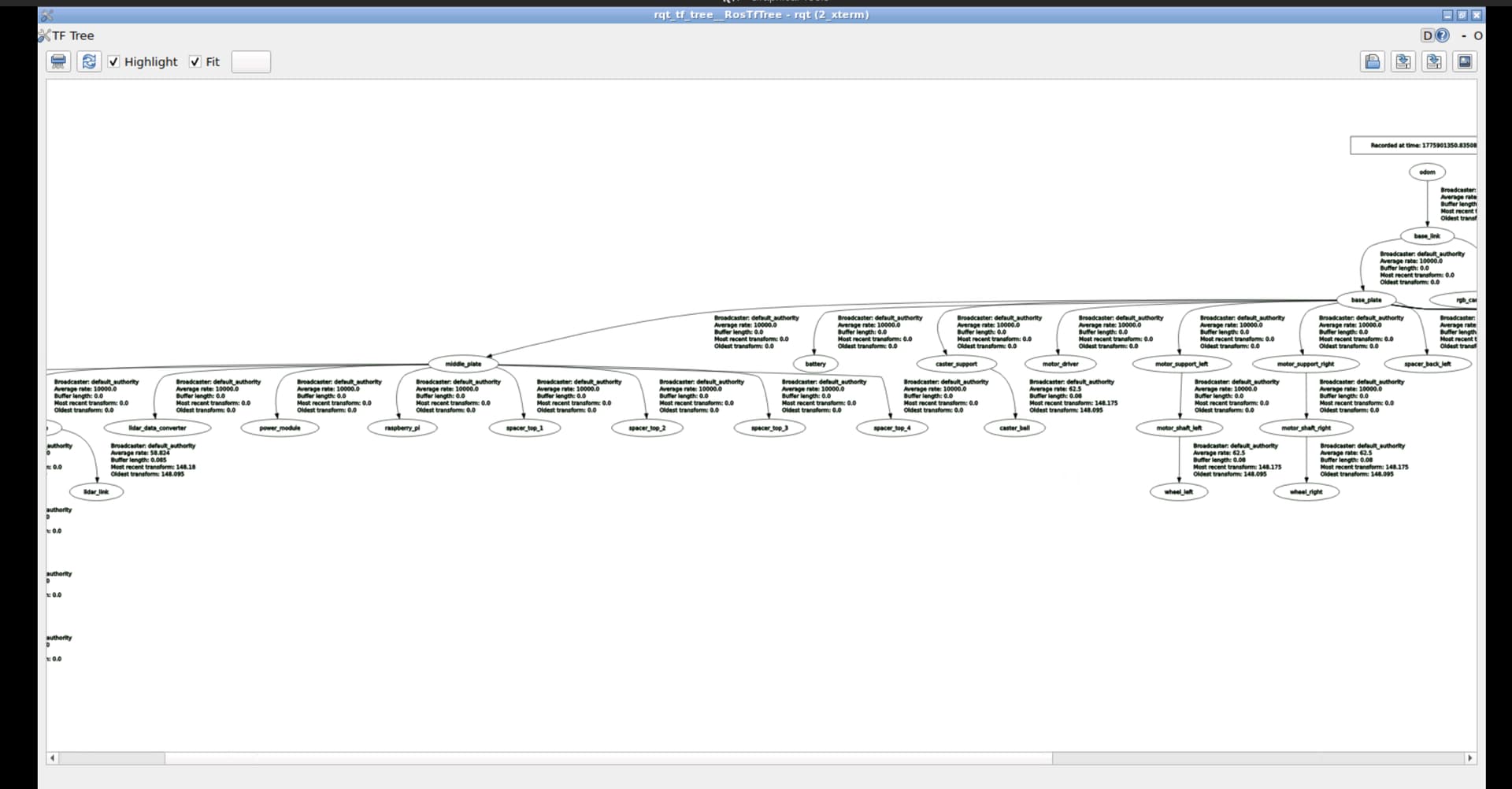
Just finishing up the URDF for ROS 2 course. I have everything working except for my lidar when I teleop command my robot the lidar is seems to move back and forth slightly on the chassis. It rotates, but also moving back and forward whilst he chassis is moving.
I understand that we use two approaches for joint_states here, lidar is ros2_control stack through gz_ros2_control and wheels/caster Gazebo Sim systems: DiffDrive and JointStatePublisher.
I’m wondering why I get this judder on the lidar. I can’t seem to figure it out - i’m also confused why we use two joint state stacks, why not just ros2_control?
If anyone could guide me a bit as to what I’m going wrong that would be great. Everything online seems to tell me just to use ros2_control to avoid the suggested issue of j/oint_states topicsgetting stale data.
Below is my sim URDF plugins:
 <!-- Differential Drive Plugin -->
    <gazebo>
        <plugin
            filename="gz-sim-diff-drive-system"
            name="gz::sim::systems::DiffDrive">
            <left_joint>wheel_left_joint</left_joint>
            <right_joint>wheel_right_joint</right_joint>
            <wheel_separation>0.093</wheel_separation>
            <wheel_radius>0.0325</wheel_radius>
            <topic>cmd_vel</topic>
            <publish_odom>true</publish_odom>
            <publish_odom_tf>true</publish_odom_tf>
            <publish_wheel_tf>true</publish_wheel_tf>
            <odom_topic>odom</odom_topic>
            <tf_topic>tf</tf_topic>
            <frame_id>odom</frame_id>
            <child_frame_id>base_link</child_frame_id>
            <update_rate>50</update_rate>
        </plugin>
    </gazebo>

   <!-- ros2_control config -->
  <ros2_control name="GazeboSimSystem" type="system">
        <hardware>
            <!-- Gazebo Sim integration plugin -->
            <plugin>gz_ros2_control/GazeboSimSystem</plugin>
        </hardware>

        <joint name="lidar_joint">
            <command_interface name="velocity">
                <param name="min">0.0</param>
                <param name="max">2.0</param>
            </command_interface>
            <state_interface name="position"/>
            <state_interface name="velocity"/>
      </joint>
   </ros2_control>

   <!-- Gazebo Sim system plugin that boots the controller manager and parses the ros2_control tags -->
   <gazebo>
    <plugin filename="gz_ros2_control-system"
            name="gz_ros2_control::GazeboSimROS2ControlPlugin">

        <!-- Controller configuration YAML file -->
        <parameters>$(find ros2_urdf_project)/config/controllers.yaml</parameters>

    </plugin>
   </gazebo>
My spawn launch:
#!/usr/bin/env python3

from ament_index_python.packages import get_package_share_directory
from launch import LaunchDescription
from launch.actions import DeclareLaunchArgument
from launch.substitutions import LaunchConfiguration
from launch_ros.actions import Node, SetParameter
from launch.conditions import IfCondition


def generate_launch_description():
    declare_model_name = DeclareLaunchArgument(
        'model_name', default_value='my_robot',
        description='Name to give the spawned robot model')
    declare_x = DeclareLaunchArgument(
        'x', default_value='0.0',
        description='Spawn X position')
    declare_y = DeclareLaunchArgument(
        'y', default_value='0.0',
        description='Spawn Y position')
    declare_z = DeclareLaunchArgument(
        'z', default_value='0.2',
        description='Spawn Z position')
    declare_yaw = DeclareLaunchArgument(
        'yaw', default_value='0.0',
        description='Spawn Yaw orientation')

    gz_spawn_entity = Node(
        package='ros_gz_sim',
        executable='create',
        name='spawn_entity',
        output='screen',
        arguments=[
            '-name',           LaunchConfiguration('model_name'),
            '-allow_renaming', 'true',
            '-topic',          'robot_description',   # reads from /robot_description
            '-x',              LaunchConfiguration('x'),
            '-y',              LaunchConfiguration('y'),
            '-z',              LaunchConfiguration('z'),
            '-Y',              LaunchConfiguration('yaw'),
        ],
    )

   # Spawner for the Joint State Broadcaster (required for TF)
    joint_state_broadcaster_spawner = Node(
        package="controller_manager",
        executable="spawner",
        arguments=["joint_state_broadcaster"],
        parameters=[{'use_sim_time': True}]
    )

    # Spawner for your specific LIDAR controller
    # Note: The argument must match the name used in your controllers.yaml
    lidar_controller_spawner = Node(
        package="controller_manager",
        executable="spawner",
        arguments=["velocity_controller"],
        parameters=[{'use_sim_time': True}],
    )

    return LaunchDescription([
        SetParameter(name='use_sim_time', value=True),
        declare_model_name,
        declare_x,
        declare_y,
        declare_z,
        declare_yaw,
        gz_spawn_entity,
        joint_state_broadcaster_spawner,
        lidar_controller_spawner
    ])
My controller.yaml:
controller_manager:
  ros__parameters:
    update_rate: 50  # Hz

    velocity_controller:
      type: velocity_controllers/JointGroupVelocityController

    joint_state_broadcaster:
      type: joint_state_broadcaster/JointStateBroadcaster

velocity_controller:
  ros__parameters:
    joints:
      - lidar_joint
    interface_name: velocity
    command_interfaces:
      - velocity
    state_interfaces:
      - position
      - velocity

joint_state_broadcaster:
  ros__parameters:
    joints:
      - lidar_joint
I’m wondering if a bit of ghosting/juddering is just expected? But mine here feels a bit more than just a slow simulation load.
Thanks