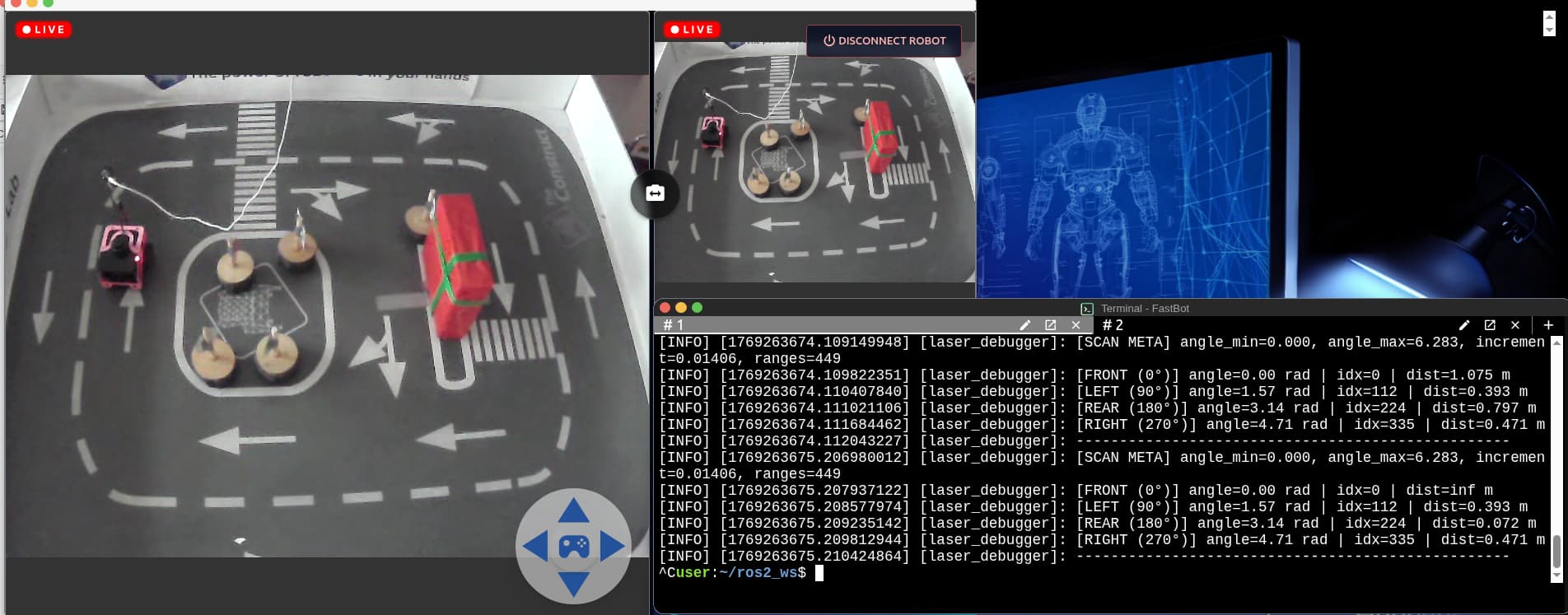
Hello, I was testing the real turtlebot robot in the lab environment. I found an issue with the robot’s rear side reading. I found that regardless of the position of the robot, the rear side’s distance reading stays almost equivalent to 0.073m. Seems like there is some element blocking the rear side reading. I created the debug script and also checked the laser data. I got the readings for all the sides using the script. I was testing the part-2, where the robot has to find the nearest wall, however, it always shows the nearest wall to be at the rear side because that reading remains the minimum of all. Due to this, I am not able to align the robot to the nearest wall. My program worked perfectly in the simulation. I have attached the images for reference as well. The rear side is at 180 degrees. Please check it and update accordingly. I checked this at different positions of the robot. Even when right wall was the nearest, it still showed rear to be the nearest. So, I am pretty sure that the rear reading isn’t correct.
Here, is the debugging output:
user:~/ros2_ws$ ros2 run lidar_utils laser_debugger_executable
[INFO] [1769263672.636345905] [laser_debugger]:  Laser Debugger Node Started
[INFO] [1769263673.009498286] [laser_debugger]: [SCAN META] angle_min=0.000, angle_max=6.283, increment
t=0.01399, ranges=451
[INFO] [1769263673.010179777] [laser_debugger]: [FRONT (0°)] angle=0.00 rad | idx=0 | dist=1.075 m
[INFO] [1769263673.010776564] [laser_debugger]: [LEFT (90°)] angle=1.57 rad | idx=112 | dist=0.393 m
[INFO] [1769263673.011420238] [laser_debugger]: [REAR (180°)] angle=3.14 rad | idx=225 | dist=0.073 m
[INFO] [1769263673.012072193] [laser_debugger]: [RIGHT (270°)] angle=4.71 rad | idx=337 | dist=0.472 m
[INFO] [1769263673.012646551] [laser_debugger]: --------------------------------------------------
[INFO] [1769263674.109149948] [laser_debugger]: [SCAN META] angle_min=0.000, angle_max=6.283, increment
t=0.01406, ranges=449
[INFO] [1769263674.109822351] [laser_debugger]: [FRONT (0°)] angle=0.00 rad | idx=0 | dist=1.075 m
[INFO] [1769263674.110407840] [laser_debugger]: [LEFT (90°)] angle=1.57 rad | idx=112 | dist=0.393 m
[INFO] [1769263674.111021106] [laser_debugger]: [REAR (180°)] angle=3.14 rad | idx=224 | dist=0.797 m
[INFO] [1769263674.111684462] [laser_debugger]: [RIGHT (270°)] angle=4.71 rad | idx=335 | dist=0.471 m
[INFO] [1769263674.112043227] [laser_debugger]: --------------------------------------------------
[INFO] [1769263675.206980012] [laser_debugger]: [SCAN META] angle_min=0.000, angle_max=6.283, increment=0.01406, ranges=449
[INFO] [1769263675.207937122] [laser_debugger]: [FRONT (0°)] angle=0.00 rad | idx=0 | dist=inf m
[INFO] [1769263675.208577974] [laser_debugger]: [LEFT (90°)] angle=1.57 rad | idx=112 | dist=0.393 m
[INFO] [1769263675.209235142] [laser_debugger]: [REAR (180°)] angle=3.14 rad | idx=224 | dist=0.072 m
[INFO] [1769263675.209812944] [laser_debugger]: [RIGHT (270°)] angle=4.71 rad | idx=335 | dist=0.471 m
[INFO] [1769263675.210424864] [laser_debugger]: --------------------------------------------------