Hi, the map in course ROS Navigation , lesson 3.3 “Launching AMCL for your robot” should be loaded by launching the map_server or localization_server launch files right? However they ar just loaded ONLY IF BEFORE the cartographer_slam package has been launched, otherwise rviz2 displays no map when adding the map icon. Perhaps there is something inside the cartographer_slam or cartographer_ros packages, which performs additional transforms or even some additional lifecycle activation which enables the map loading…not sure just diagnosed the issue. The problem is that this is far from the correct behaviour, I mean we should get the map by map_server pkg activation only, launching by map_server or localization_server launch file isn’t it?
Hi Marcus,
it is not necessary to launch the cartographer nodes for localization. cartographer nodes are only required for the creation of the map. Once it has been created, cartographer is not needed anymore.
Once the map is created, you only need to launch the map_server with the proper launch file. That is the node that will publish the map in the topic /map on frame /map.
I think that you may be suffering two confusions:
-
The QoS configuration of the topic /map that you are putting in rviz2 is not correct. Hence, even if you select the topic in rviz2 you won’t be able to see the map.
-
You are not selecting the
Fixed framein rviz2 as/map
To solve those problems:
I. Launch the map_server properly configured (as indicated in the course)
II. Launch rviz2
III. In rviz2 select the Fixed Frame as /map
IV. In rviz2, Add display by topic, and then select the topic /map
V. In rviz2, open the properties of the /map topic display and select QoS
Reliability: Reliable
Durability: Transient Local
Then you should see the map like in the figure below
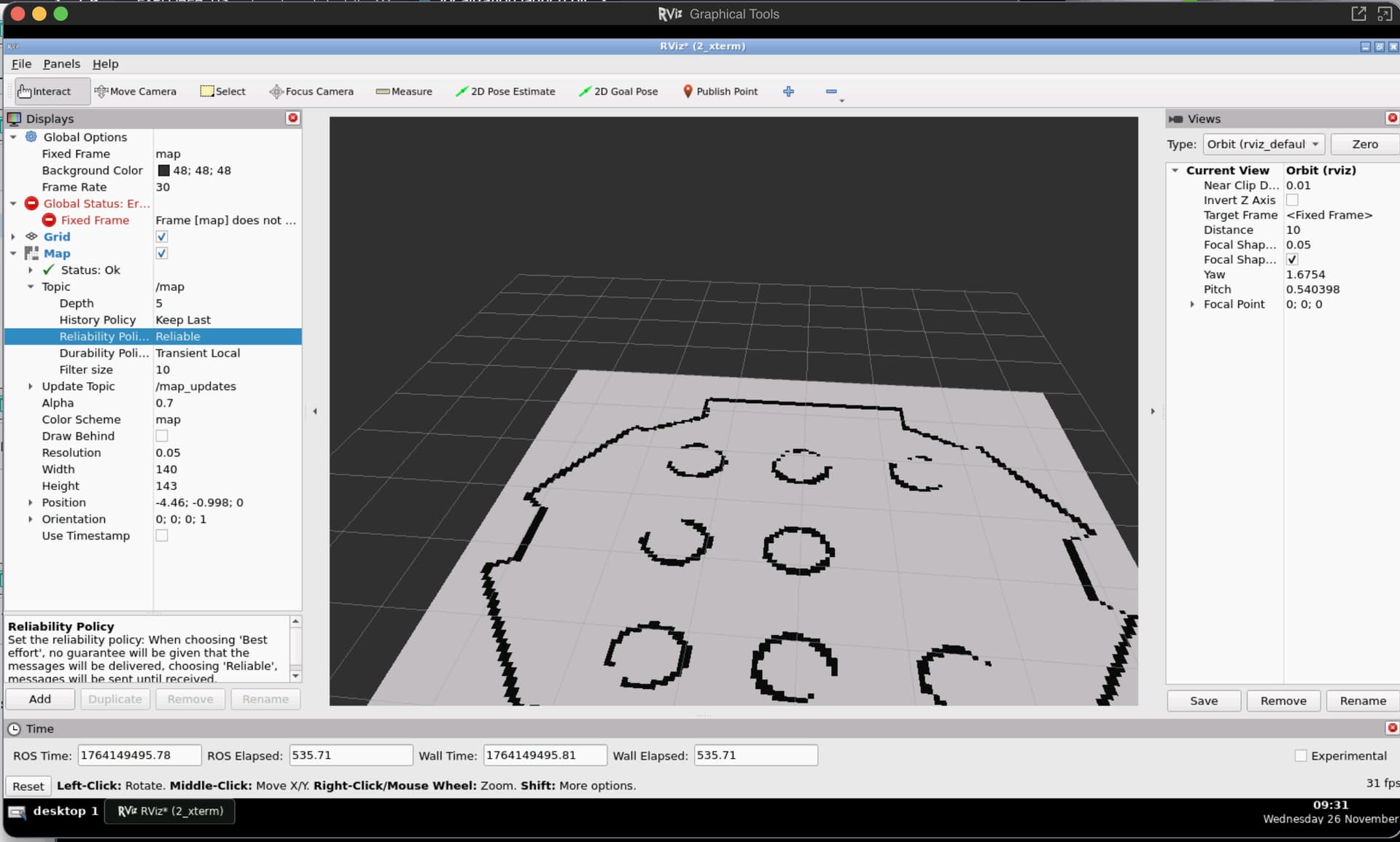
If you cannot see the map, then you have wrongly launched the map_server. Here my launch file for the map_server
from launch import LaunchDescription
from launch_ros.actions import Node
import os
from ament_index_python.packages import get_package_share_directory

map_file = os.path.join(get_package_share_directory('map_server'), 'config','turtlebot_area.yaml')

def generate_launch_description():
    return LaunchDescription([
        Node(
            package='nav2_map_server',
            executable='map_server',
            name='map_server',
            output='screen',
            parameters=[{'use_sim_time': True},
                        {'yaml_filename':map_file}
                       ]),

        Node(
            package='nav2_lifecycle_manager',
            executable='lifecycle_manager',
            name='lifecycle_manager_mapper',
            output='screen',
            parameters=[{'use_sim_time': True},
                        {'autostart': True},
                        {'node_names': ['map_server']}])
    ])
or, if you want to launch the map_server inside the same launch as the localization, use this launch file:
from launch import LaunchDescription
from launch_ros.actions import Node
import os
from ament_index_python.packages import get_package_share_directory

map_file = os.path.join(get_package_share_directory('map_server'), 'config','turtlebot_area.yaml')
nav2_yaml = os.path.join(get_package_share_directory('localization_server'), 'config','amcl_config.yaml')

def generate_launch_description():
    return LaunchDescription([
        Node(
            package='nav2_map_server',
            executable='map_server',
            name='map_server',
            output='screen',
            parameters=[{'use_sim_time': True},
                        {'yaml_filename':map_file}
                       ]),

        Node(
            package='nav2_amcl',
            executable='amcl',
            name='amcl',
            output='screen',
            parameters=[nav2_yaml]),

        Node(
            package='nav2_lifecycle_manager',
            executable='lifecycle_manager',
            name='lifecycle_manager_localizer',
            output='screen',
            parameters=[{'use_sim_time': True},
                        {'autostart': True},
                        {'node_names': ['map_server','amcl']}])
    ])
1 Like
Hi Ricardo thanks for the complete answer. Actually when I kill and relaunch the same launch file twice or three times then it works…I am not sure why this behavior…but it works. Or also changing to transient local it works…thanks!
This topic was automatically closed 5 days after the last reply. New replies are no longer allowed.