
That’s strange, because it should work out of the box (it worked for me just now).
Please run:
source /home/simulations/public_sim_ws/devel/setup.bash
and then try again.
If it still doesn’t work, please show us the output of the command given above.
Thanks a lot @bayodesegun ! this command finally fixed the issue.
the only thing is that now the simulation runs on a different path: /home/simulations/public_sim_ws/devel and if i run roscd it comes back to this path instead of catkin_ws. is it normal?
if I come back to /home/user/catkin_ws and i try to run
roslaunch iri_wam_aff_demo start_demo.launch
I get the same error as before:
RLException: [start_demo.launch] is neither a launch file in package [iri_wam_aff_demo] nor is [iri_wam_aff_demo] a launch file name The traceback for the exception was written to the log file
You’re welcome.
No, that’s strange; you can launch a roslaunch from anywhere, as long as you source the right workspace. You need not switch to a specific directory to do that. Perhaps that’s what’s causing the errors.
You can also source from anywhere, as long as you use absolute paths (like the one I gave you).
Running the demo should be as simple as typing (or copy/paste) this on any of the terminals:
roslaunch iri_wam_aff_demo start_demo.launch
If that does not work (it always does for me), then run the source command and try again
source /home/simulations/public_sim_ws/devel/setup.bash
roslaunch iri_wam_aff_demo start_demo.launch
roscd returning /home/simulations/public_sim_ws/devel after that source is normal. Whenever you need to run another package from catkin_ws (or any other workspace), you must source that specific workspace.
source /home/user/catkin_ws/devel/setup.bash
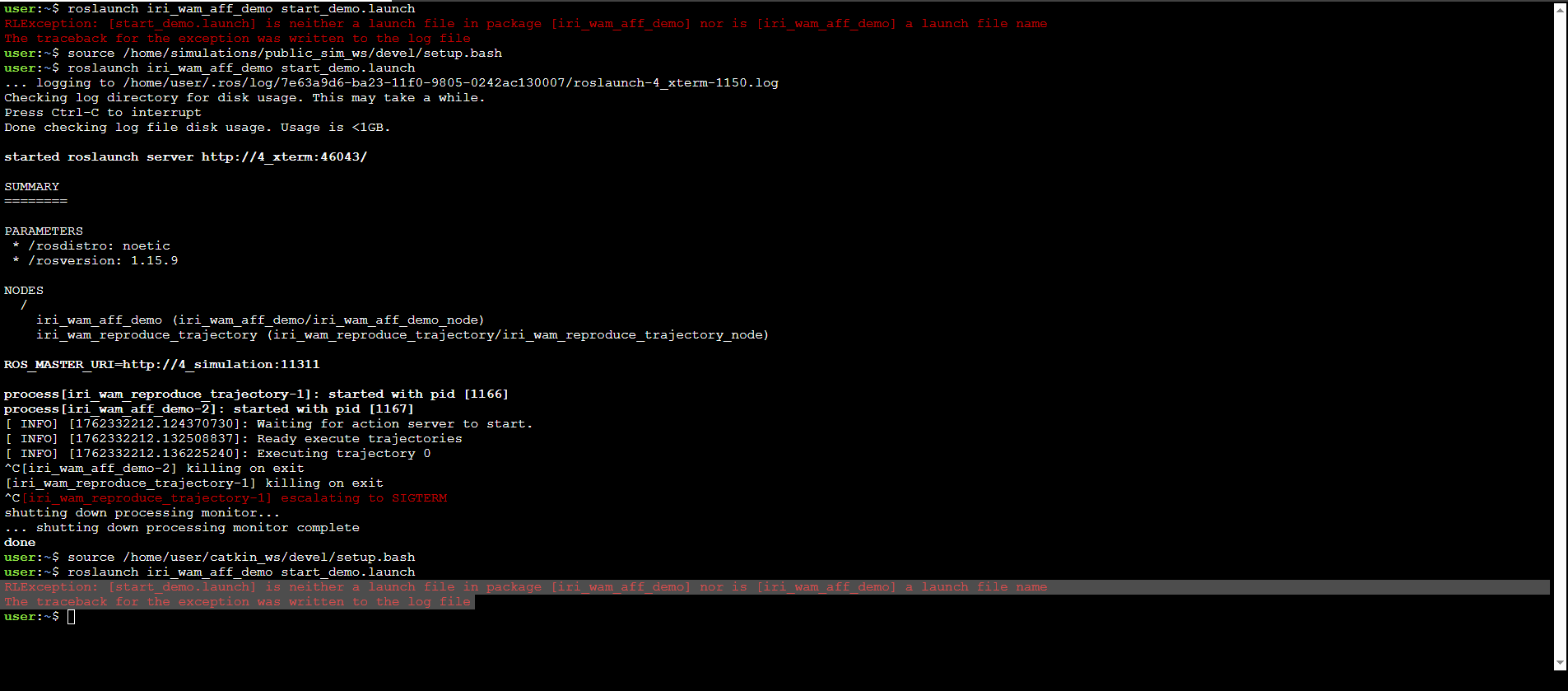
how you can observe from the shell, if i run:
“roslaunch iri_wam_aff_demo start_demo.launch”
after sourcing in “source /home/simulations/public_sim_ws/devel/setup.bash” it works.
But if i run the same command from “source /home/user/catkin_ws/devel/setup.bash”
it prompt the same error:
“RLException: [start_demo.launch] is neither a launch file in package [iri_wam_aff_demo] nor is [iri_wam_aff_demo] a launch file name The traceback for the exception was written to the log file”
That seems normal, as far as I know. ROS attempts to locate the package in the “current” (most-recently sourced) workspace.
That said, let me ask one of our experts to confirm this.
In the meantime, please continue with your lessons. This is a minor issue.
@bayodesegun today I moved to /home/user/catkin_ws
and run
rospack profile
package list was updated and now i can execute:
roslaunch iri_wam_aff_demo start_demo.launch
from /home/user/catkin_ws as well.
thanks for all your help. i really appreciated it!