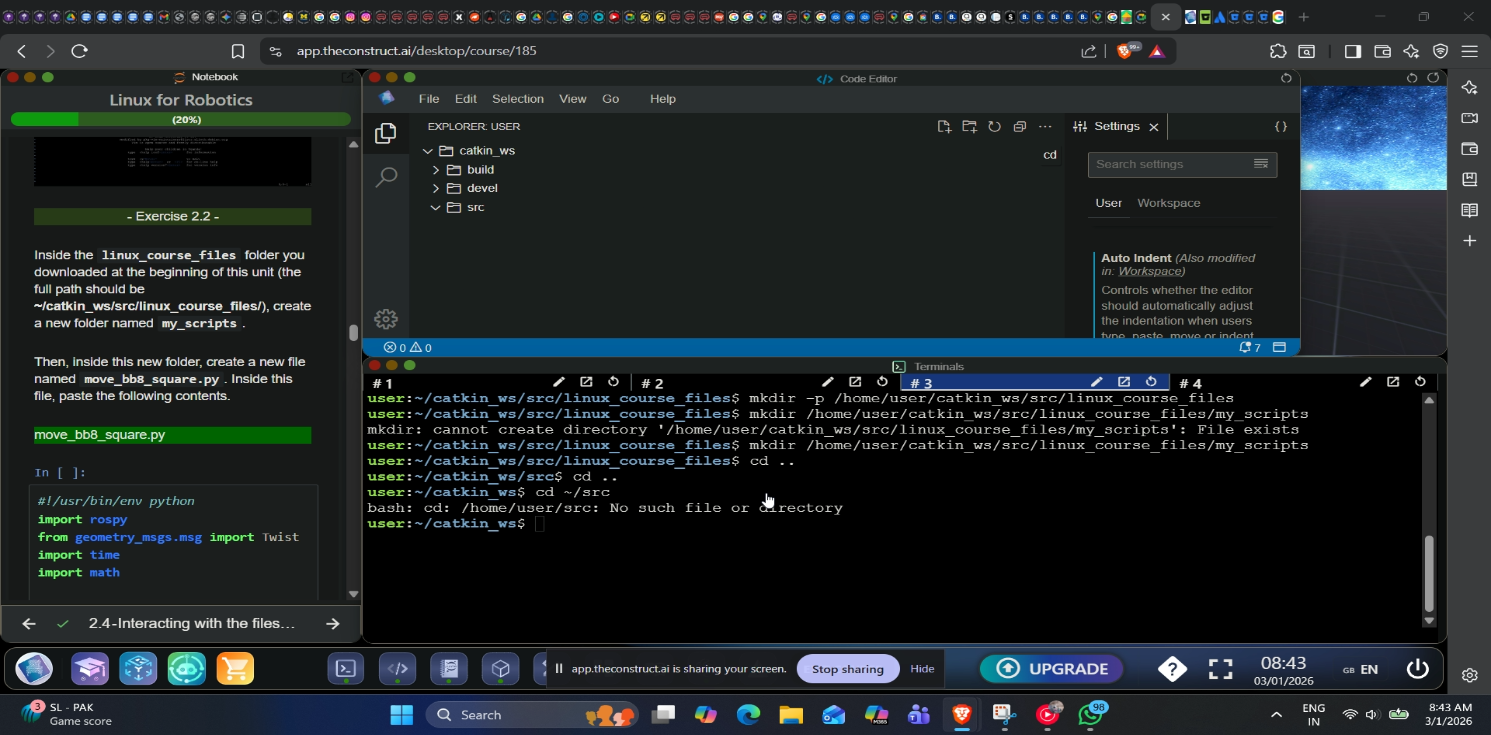
I am trying to create the folder but it does not allow the folder to be created by the terminal which defeats the purpose of the whole learning experience. More precisely, the terminal is not accessing catkin_ws and thus the entire process is going haywire. It is remaining stuck at home/user path and going no further.
I don’t see any bug, based on the screenshot you shared (thanks for that). What I see is that you are not yet familiar with the Linux shell. Don’t worry, you’ll get used to it soon.
Here’s an explanation of what’s happening based on what I see in the image.
You are already in the linux_course_files (~/catkin_ws/src/linux_course_files) directory, as shown by the blue markers after user: Please note that ~ stands for /home/user in this case. It’s a shortcut for the current user’s home directory.
You ran the command mkdir -p /home/user/catkin_ws/src/linux_course_files, telling the system to create the folder ~/catkin_ws/src/linux_course_files, which already existed and is your current directory. This should have generated an error, but the -p parameter tells the system to ignore the command if the folder already exists.
Your next command, mkdir /home/user/catkin_ws/src/linux_course_files/my_scripts generated an error because the folder my_scripts already existed and the -p parameter was missing. You ran the command again, and the system ignored it this time
Next you ran the command cd .. twice, and this change to the parent directory twice, bringing you from ~/catkin_ws/src/linux_course_files to ~/catkin_ws/ (or /home/user/catkin_ws).
Next, you probably tried going back to /home/user/catktin_ws/src, but you typed cd ~/src, which is equal to cd /home/user/src, which does not exist. The system complained accordingly.
Two takeaways for you, to avoid errors and become a Linux pro:
Keep an eye on the blue marker, which indicates your current directory.
Bear in mind that ~ is a shortcut for /home/user.
I suppose the folder you were trying to create was my_scripts, which already existed. Here’s how you can fix that.
cd /home/user/catkin_ws/src/linux_course_files
# Now you are already in `linux_course_files`, which is the parent of `my_scripts`
# Run `ls` to confirm that it's there, and use `cd my_scripts` to change to that directory
ls
cd my_scripts